
UXR SEO Analyzer
Complete SEO diagnostics in one click, right in your browser
100% free · No signup · No limitsKey Features
100% Free and Local
No hidden costs, no subscriptions, no usage limits. All analysis runs in your browser without sending data to external servers.
Real-Time Analysis
Get instant results while browsing. Click the extension icon on any page and receive the complete diagnosis in seconds.
Actionable Recommendations
Each detected issue includes clear issue description, severity level (1-5) with distinctive colors, estimated SEO impact (High, Medium, Low), current value vs recommended value, and specific steps to resolve it.
Privacy by Design
No registration or login required. Analysis runs 100% in your browser, with no tracking, analytics, or telemetry. Your data only leaves your machine if you generate a shareable report (a manual action via the “Report” button).
Who is This Tool For?
SEO Professionals and Marketers
Technical audits without relying on paid tools. In-depth analysis in seconds. Ideal for client audits, competitor analysis, and landing page and content optimization.
Web Developers
Verify technical SEO implementation while developing. Detect issues before deployment. Validate schemas, meta tags, and performance.
UX/UI Designers
Validate accessibility and usability from the design stage. Check WCAG compliance. Review color contrast and semantic elements.
Agencies, Consultancies and Freelancers
Free tool for the entire team. Consistent, professional reports. Clear SEO diagnostics to communicate priorities to clients without deep technical knowledge.
Explore in detail
5 Actionable Diagnostic Levels
Each evaluable metric is automatically classified into one of five levels to help you prioritize which issues to tackle first. Purely informational metrics show a neutral level (—) with no score:
Analysis Tabs
Overview
Get a panoramic view of your page's SEO status in seconds. This tab presents an executive summary with evaluations of all categories organized by priority level, highlighting the 5 critical issues requiring immediate attention.
Meta & Tags
Verify that your page meets the essential fundamentals that search engines need to properly understand and index your content. Evaluates title tags, meta descriptions, heading structure (H1-H6), canonical URLs, robots directives, Open Graph, mobile viewport, and language declaration.
Performance & Technical
Measures speed using Google's official Core Web Vitals (LCP, INP, CLS, FCP, TTFB) including the 2025 LCP phase breakdown. In the same tab it ensures search engines can crawl and index your site: 2025 security analysis (COOP, CORP, HSTS), Brotli/Gzip compression, robots.txt, XML sitemap, and HTTP headers for performance and SEO.
Content
Evaluate whether your content is sufficient, relevant, and well-structured to satisfy search intent. Analyzes word count, top keywords, text/HTML ratio, paragraph structure, readability, and internal/external links.
Images
Optimize your images to improve accessibility and performance. Identifies images without alt text, legacy formats, oversized images. Includes LCP lazy-load warning 2025.
AI Discovery
Prepare your content for AI-powered searches and LLMs. Verifies Schema.org JSON-LD with syntax validation, types, completeness. Detects llms.txt, AI robots, Content Licensing, and Rich Results eligibility.
Accessibility
Ensure WCAG 2.2 compliance (ISO Standard 2025). Verifies color contrast, forms with labels and ARIA, roles/attributes/landmarks, duplicate IDs. Includes Interactive Highlights 2025.
International
Expand your reach to multiple countries and languages with the correct configuration for international SEO. Verifies lang attribute, hreflang tags, and content localization quality.
E-commerce
Maximize visibility in Google Shopping with 2025 schemas. Analyzes Product schema, offers, reviews. Includes OfferShippingDetails, MerchantReturnPolicy, LoyaltyProgram, and Google Store Widget.
Installation and Usage
Installation
It's very simple:
- Visit the Chrome Web Store
- Click "Add to Chrome" or "Add to Edge"
- The UXR SEO icon will appear in your toolbar
Daily Use: Pin the Extension for Quick Access
To use the extension easily, I recommend pinning it to your Chrome toolbar:
- Click the extensions icon (puzzle piece) in the Chrome toolbar
- Find "UXR SEO Analyzer" and click the pin icon
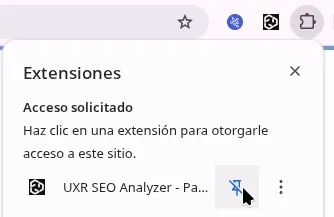
Once pinned, the UXR SEO icon will be always visible in your toolbar for quick access.
- Navigate to any webpage you want to analyze
- Click the UXR SEO icon and that's it - you'll see the complete analysis

That simple - just one click and you get a complete SEO diagnosis of any webpage.
Compatibility
- Google Chrome (version 114+)
- Microsoft Edge (version 114+)
- Any Chromium-based browser with side panel
- Firefox (uses Gecko engine, not Chromium)
- Safari (uses WebKit engine)
Frequently Asked Questions
Is it really free?
Yes, completely free with no premium features, usage limits, or hidden costs.
Do you send my data to any server?
Not automatically. All analysis runs 100% locally in your browser, with no tracking, analytics, or telemetry. The only exception is manual: if you click the “Report” button, a page opens on uxr.cl with your analysis results encoded in the URL. Nothing leaves your browser unless you ask for it.
What does the “Report” button do?
It's a manual action that generates a shareable report of your analysis. When clicked, the extension encodes the results (analyzed URL, scores, and metrics) into the address and opens the report page on uxr.cl. That's the only time your analysis data leaves the browser, and only when you choose to.
How complete is the analysis?
It's a deterministic diagnosis: it applies rules and heuristics to the HTML and DOM of the page loaded at that moment. It does not crawl the whole site, use real field data or AI models, and some signals (such as E-E-A-T) are pattern-based approximations. It's a fast, actionable guide — not a replacement for a full manual audit.
Can I use the extension on internal sites or localhost?
Yes, the extension works on any URL, including localhost, local IPs, corporate intranets, sites behind VPN, and private staging environments.
Documentation
Every metric the extension evaluates is documented here. These are the hubs by topic; each one leads to the reference pages for that area.
- Accessible Web Components Hub
Building accessible web components requires understanding both the visual and programmatic aspects of user interfaces
- AI SEO Hub
The rise of AI assistants—ChatGPT, Claude, Gemini, Perplexity—is transforming how people find and consume information
- Basic SEO Fundamentals
Every successful website is built on a foundation of solid SEO fundamentals
- Content Quality Hub
Content quality is the foundation of successful SEO
- Image SEO & Optimization
Images are critical to user engagement—but they can also be your website's biggest performance bottleneck
- Performance SEO Hub
Performance is a critical ranking factor and directly impacts user experience
- Resource Optimization Hub
Resource optimization is fundamental to web performance
- Technical SEO Hub
Technical SEO metrics provide deeper insights into page performance beyond Core Web Vitals
- WCAG 2.2 Compliance Hub
Web accessibility ensures that websites and applications can be used by everyone, including people with disabilities
- Web Accessibility Hub
A curated web accessibility index introducing WCAG 2.2, its conformance levels, and linking the site's key accessibility guides.
- Structured Data
Curated hub for structured data: schema.org, meta robots, Open Graph, and canonical URLs working together for rich results.
- Performance Technical Hub
Curated index of our technical performance guides: critical CSS, JavaScript, server response, and blocking resources.
Support and Community
Leave Your Opinion
If you use the extension, your feedback is very valuable. Please leave an honest review on Chrome Web Store.
Chrome Web StoreSupport the Project
Built by Mauricio from the UXR team. If you find it useful, you can support its development:
- Buy Me a Coffee
- Ko-fi
- Leaving a 5-star review
- Mauricio (UXR)